
SMISC in ANSYS Workbench
If you’re an APDL user transferring to the Workbench interface, then this is a quick post to explain how to plot SMISC in ANSYS Workbench. SMISC stands for summable data and is specific to each element type. An example is result data for beam shear forces and bending moment. The same approach can also be used to plot NMISC non-summable data in Workbench too.
Plot SMISC in ANSYS Workbench
The ANSYS help manual contains information on the summable and non-summable output quantities available for each element type. For example, BEAM188 elements have SMISC quantities for beam shear force and bending moments.
It was not immediately obvious to me how to plot SMISC in ANSYS Workbench, but here’s how to do it.
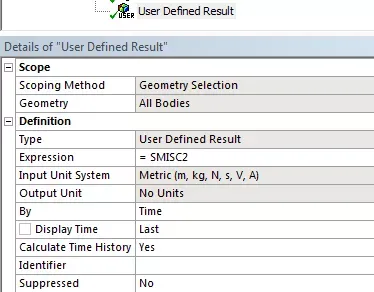
- Insert a User Defined Result object
- Use the expression SMISC# where # is the number of the SMISC quantify to plot
- (If you have any issues make sure that the analysis output includes any extra data if required, for example for miscellaneous data associated with contact elements)
The screenshot below shows the User Defined Result with the expression SMISC2 to obtain, in this case, the warping bimoment for a BEAM188 element.
Plot SMISC in ANSYS Workbench