
Excel chart with manual data entry
Sometimes in Excel you may want to quickly add a chart series with manual data directly. Normally to chart data you would enter data in cells and then create a chart series from the cell data. But there is a simple way where you can directly enter an array of data points manually to quickly set up a series on a chart. This avoids the need to refer to cells in the workbook.
How to create an Excel chart with manual data entry directly
This is best explained via the screenshot below, where the data is entered directly in curly brackets. In the example below I’ve added a constant allowable stress to a chart using this direct manual entry method. That way my worksheets can stay neat, but still show important information on charts.
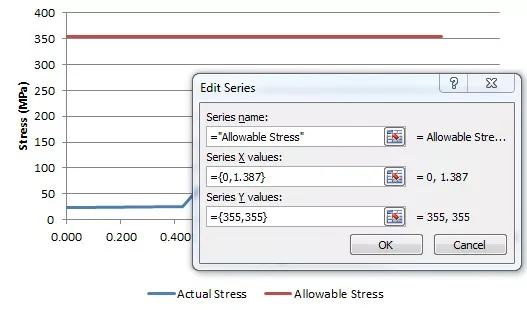
This approach is best suited when you need to directly add a single point, or simple line to a chart, anything more complicated and you would be best to chart a series using data in Excel cells as normal.