
Elastic-Plastic Analysis in ANSYS Gives Stress Above Yield
If you’ve ever turned on bilinear elastic-perfectly-plastic properties, you may have wondered why sometimes an elastic-plastic analysis in ANSYS gives stress above yield.
Why is the stress above yield?
If you have specified a bilinear stress-strain curve then you may wonder how the stress can be above yield. It certainly makes reviewing contour plots difficult and open to challenges. The reason why the stress can be above yield in ANSYS is due to how ANSYS handles extrapolation of stresses from integration points to nodes. The default behaviour is as follows:
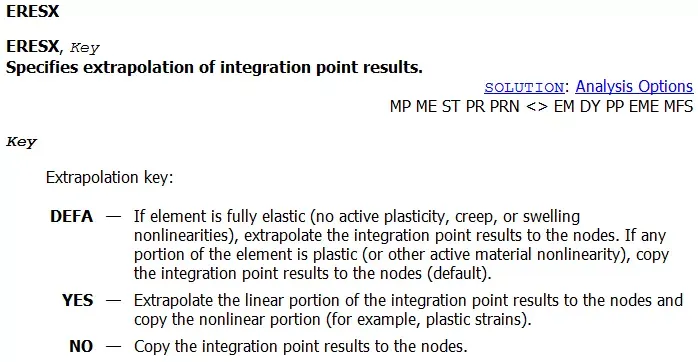
- If element is fully elastic (no active plasticity, creep, or swelling nonlinearities), extrapolate the integration point results to the nodes. If any portion of the element is plastic (or other active material nonlinearity), copy the integration point results to the nodes.
This means that if an element integration point exceeds yield, then this limit will be copied to the nodes – which is what we would want. The issue comes when an adjacent element has stresses at the integration points that are below yield, in which case the default behaviour is to extrapolate these stresses, which often means extrapolating stresses to above yield – not what we want!
The command which changes this default behaviour is ERESX. The ANSYS manual entry is as follows:
Changing the Default Integration Point Extrapolation Settings
The ERESX command controls the extrapolation settings. So it’s a simple matter of using ERESX,NO to force ANSYS to copy the integration point stresses to the nodes. This ensures that stresses will never exceed yield as the stresses at the integration points can never exceed yield.
If you are using Workbench, then a command snippet can be used to change this behaviour – I don’t think there is a way to change the settings directly in the Workbench interface.
Let’s See an Example
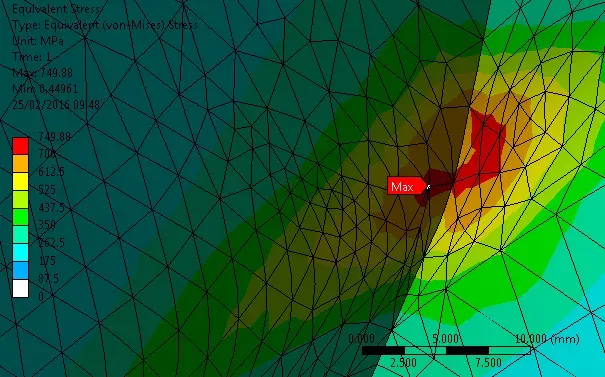
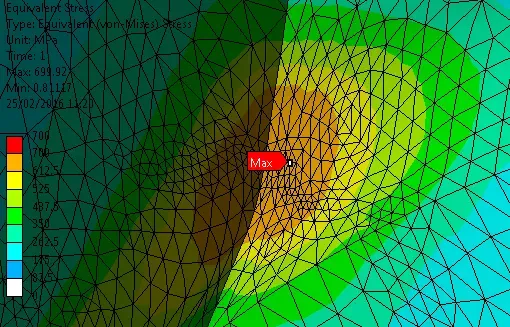
So the two figures below show the same analysis, one with default settings and the other using ERESX,NO. Yield in this example is set as 700 MPa. You can see that with the default settings, using an elastic-plastic material model, that stresses are significantly above yield.
Closing Remarks
It goes without saying that disabling extrapolation should be done with care and whilst ensuring sufficient mesh refinement. One way to check if the is refined enough is to review ANSYS Percentage Stress Error. Check out command ERESX and see if it can help you better understand and interact with your model.